Amazon Advertising
Amazon Prime Day 2026 Final-Week Checklist: 10 Things to Lock In Before Day 1
Prime Day 2026 runs from June 23-26. The move pulled every upstream seller deadline roughly four weeks earlier than the 2025 July event, which compressed the prep runway for everyone selling on the platform. That changes what a final checklist is for. By the last week, the irreversible decisions are already made: inventory is shipped, deals are submitted, the structure is built. This week is verification plus the few levers still in your hands. Two of the ten items below are already locked, so the job there is confirming them. The other eight are still fully movable, and that is where the final week earns its keep.

Learn How to Make Listings That Convert in 2025!
Read our step-by-step guide on how to optimize your listings using Rufus AI insights. Sign up for our newsletter and get your copy for free!
Show me howThe cost of an unchecked box is higher this year than last. Amazon’s own Q4 2025 earnings put full-year 2025 advertising services net sales at $68.6 billion, up 22% year over year. More brands are spending more on Amazon ads than ever, into a calendar that gives you less time to fix anything. A clean setup matters more in a crowded, compressed event.
This is the checklist a full-service Amazon team runs in the final week. Each item is a verify step with a one-line reason it matters now, and a link to the deeper playbook if you need the full how. The series spine sits behind it: the Prime Day 2026 budget framework, the full ad stack, and the external traffic playbook.
When is the next Prime Day 2026?
Amazon has confirmed that Amazon Prime Day 2026 runs June 23–26, its first June event since 2021. This year’s event follows the four-day format Amazon used in 2025.
The checklist below assumes the confirmed four-day window of June 23–26. If Amazon updates the dates or shortens the event, the sequencing still holds and only the calendar shifts.
What should I check before Amazon Prime Day 2026?
Before Prime Day 2026, verify ten things in the final week: inventory is checked in and FBA-available, listings are optimized and final, A+ Content is live on the page, ad campaigns are activated and past the learning phase, deal submissions are approved and scheduled, budget caps are staged by phase, dayparting rules are configured, competitor monitoring is on, retargeting audiences are built, and external traffic campaigns are scheduled to fire. The rest of this post is the verification detail on each, with the deep-dive linked where you need the mechanics.
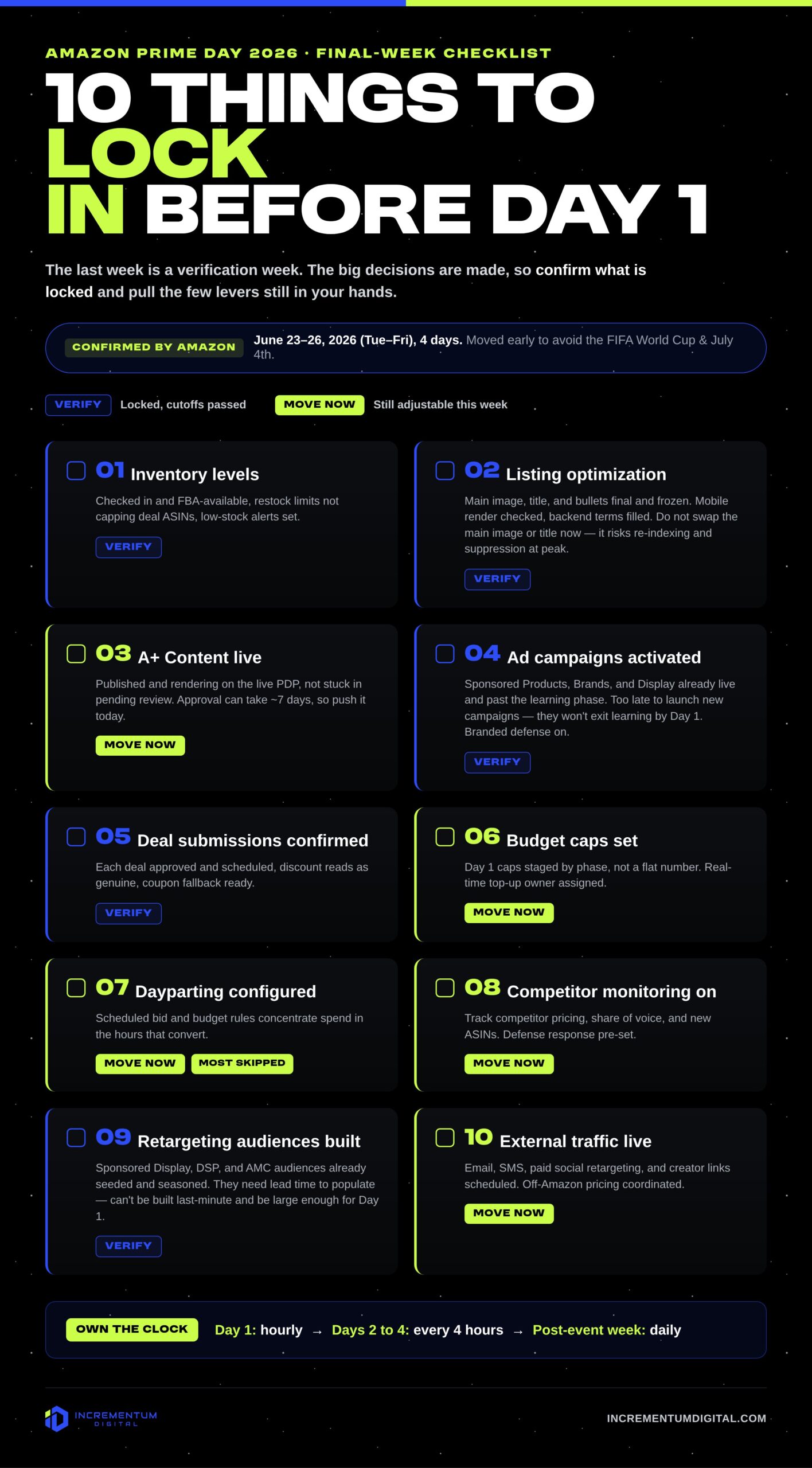
Dates confirmed by Amazon as of June 2, 2026 and subject to change. This checklist is general guidance for informational purposes only, not a guarantee of results — verify deadlines and policies against your own Seller/Vendor Central account.
What is locked and what you can still move this week
Sort the ten items by what you can still change. Inventory and deal submissions are locked once the cutoffs pass, so the work there is confirming what you already committed. Everything else is still adjustable this week, which means it is where your final-week attention should go.
| # | Checklist item | Going into the final week | What to confirm |
|---|---|---|---|
| 1 | Inventory levels | Locked, verify | Inbound checked in and FBA-available, restock limits not capping deal ASINs, low-stock alerts set. |
| 2 | Listing optimization | Movable | Main image, title, and bullets final, mobile render checked, backend terms filled and AI-readable. |
| 3 | A+ Content live | Movable | Published and rendering on the live PDP, not stuck in pending review. |
| 4 | Ad campaigns activated | Movable | Sponsored Products, Brands, and Display live and past the learning phase, branded defense on. |
| 5 | Deal submissions confirmed | Locked, verify | Each deal approved and scheduled, discount reads as genuine, coupon fallback ready. |
| 6 | Budget caps set | Movable | Day 1 caps staged by phase, real-time top-up owner assigned. |
| 7 | Dayparting configured | Movable | Scheduled bid and budget rules concentrate spend in the hours that convert. |
| 8 | Competitor monitoring on | Movable | Tracking competitor pricing, share of voice, and new ASINs, defense response pre-set. |
| 9 | DSP retargeting audiences built | Movable | Sponsored Display, DSP, and AMC audiences seeded and large enough for Day 1. |
| 10 | External traffic campaigns live | Movable | Email, SMS, paid social retargeting, and creator links scheduled, off-Amazon pricing coordinated. |
1. Inventory levels: confirm what is checked in
Confirm your inbound units are checked in and showing as FBA-available, not just delivered to the building. Verify that restock limits and your IPI are not capping the deal ASINs, and set a low-stock alert on every SKU running a deal.
The FBA inbound cutoffs for this event have already passed, since the June move pulled them roughly four weeks earlier than 2025 (we documented the cutoff schedule in the external traffic post). You cannot ship more in time this week, so the work is making sure what you sent is sellable and that a Day 1 sellout will not orphan your rank. Running out mid-event leaves you ranking on an out-of-stock listing, which Amazon penalizes for weeks after you restock. That is the single most expensive way to win Day 1 and lose the month, and it is why hero-SKU inventory cover belongs in the structural decisions that decide whether spend scales cleanly.
2. Listing optimization: confirm the page is final
Confirm every deal ASIN’s main image, title, and bullets are final, and check the mobile render rather than only the desktop view, since most Prime Day traffic arrives on a phone. Confirm the backend search terms are filled and that the copy reads in natural language that Rufus and Alexa for Shopping can parse, not a wall of keywords.
Listing quality is the last cheap lever before traffic spikes. Doubling ad spend on a page converting at 12% just buys more clicks at 12%, so the conversion work has to happen on the listing before the budget goes up. This is a verify step this week, not a rebuild: our Amazon listing optimization guide, updated for 2026, is the deep-dive on the work itself, and our guide to optimizing for Rufus AI covers the AI-readability side. If you are weighing whether to bring in listing optimization services for the next cycle, the final week is a good audit of how much your current pages are leaving on the table.
3. A+ Content live: confirm it is on the page
Confirm your A+ Content, and Premium A+ or brand story where you have it, is published and actually showing on the live product detail page, not sitting in submitted or pending review. Check that the modules render on mobile and that any comparison chart points to your own catalog rather than handing a competitor free placement.
A+ approval can take days, and a review queue backed up the week of a major event is a real risk worth ruling out now. A module that is still pending is not converting anyone, and A+ is one of the conversion levers that decides whether the ad spend behind it pays back. Treat it as part of the same conversion-rate foundation covered in the scaling structural-decisions breakdown.
4. Ad campaigns activated: confirm they are live and warmed up
Confirm Sponsored Products, Sponsored Brands and Sponsored Brand Video, and Sponsored Display are live, out of draft, and have had enough run-time to exit the learning phase before Day 1. Confirm your branded-defense campaigns are on, because competitors will bid against your brand terms with deeper deals than usual during the event.
Campaigns stood up the week of the event pay tuition during the most expensive week of the year, since they need conversion history before the algorithm places them efficiently. Which formats to run and the order to build them sit in the full ad stack post, and the branded-defense setup is in our breakdown of bidding on branded keywords.
5. Deal submissions confirmed: verify, then build a fallback
Confirm each submitted deal shows approved and scheduled, and confirm the deal price will read as a genuine discount against your trailing price rather than as a reset of a recent promotion. For any ASIN that did not land a deal, have a coupon or a Prime Exclusive Discount staged as a fallback.
The deal-submission window closed before this week, so you cannot add a Best Deal now. You can verify the ones you have, and a coupon is still available as a backstop. Hold your reference pricing steady into the event, because the price-history view shoppers now see makes a thin discount obvious. The reference-pricing risk and the Best Deal versus Prime Exclusive Discount fee math (an upfront fee plus a small percentage of sales per Amazon’s deal terms, which you should confirm in your own Seller Central deal dashboard) are both covered in the external traffic post.
6. Budget caps set: stage the spend by phase
Confirm your Day 1 deal-ASIN caps are staged as a percentage plan rather than a flat daily number, confirm your campaign budgets will not exhaust in the first three hours, and confirm someone can top budgets up in real time on Day 1. Day 1 has done the heaviest lifting on every Prime Day we have run, including the four-day 2025 event.
The budget that looks fine on paper is the one that runs out mid-morning on Day 1 and hands the back half of the event to a competitor. Stage it by phase now. The full percent-based framework, with a worked example for a $25K per month advertiser, is in the budget post, so use this step to confirm the plan is loaded, not to redesign it.
7. Dayparting configured: the item most teams skip
Confirm your bid and budget rules concentrate spend into the hours your category actually converts during the event, and that those rules are scheduled rather than something a person has to toggle manually at two in the morning. This is the verify step that quietly separates an efficient event from an expensive one.
Dayparting is the item that gets skipped because it is invisible until Day 1, when flat 24-hour pacing funds low-conversion overnight hours at peak CPCs. It is the cleanest efficiency gain still available in the final week, and it costs nothing but the setup time. Keep the rules explicit and auditable rather than buried in a black-box tool, for the same reason the structural-decisions post argues against automation you cannot read: when something moves on Day 1, you need to know which rule fired.
8. Competitor monitoring on: set the response in advance
Confirm you are tracking competitor deal pricing, your share of voice on category and branded terms, and any new ASIN launches in your space. Decide your branded-defense response before the event so you are reacting from a plan, not improvising at peak CPC.
Competitors bid harder on your branded terms with deeper deals during the event, and watching that live without a pre-set response means losing cheap conversions you should have kept. How much to commit to branded defense, and when, is covered in our piece on allocating budget toward branded terms.
9. DSP retargeting audiences built: confirm they are seeded
Confirm your Sponsored Display views-remarketing audience is built and filling from the pre-Prime research traffic, and where the category supports it, that your DSP and AMC cart-abandoner and PDP-viewer audiences are populated and large enough to be useful on Day 1. Audiences need days to fill, so this is the last week to confirm they are seeded.
Days 3 and 4 are a retargeting event more than a deal push, and the warm audience you close late is the one accumulating right now. DSP is not the right priority for every category, since low-repeat and non-consumable products often cannot defend the economics, so treat this item as conditional on your category. The roles each retargeting layer plays are in the ad stack post, and how AMC feeds those audiences is in our AMC explainer.
10. External traffic campaigns live: confirm the on-demand channels fire
Confirm your owned channels are scheduled, with an email and SMS teaser at roughly T-3 announcing participation rather than the price, your paid social retargeting is set against the warm cohort, and any creator or shoppable-link content is queued to go on Day 1. Confirm your off-Amazon pricing sits at or above your Amazon reference price so a cheaper listing elsewhere does not undercut the deal.
External traffic now does two jobs at once: it drives sessions to your PDP, and it feeds the brand signals that AI shopping surfaces use to decide which brands to recommend. AI-driven traffic to U.S. retail sites grew 393% year over year in Q1 2026, per Adobe’s retail analytics report, and as of May 2026, NielsenIQ found 42% of U.S. shoppers had used an AI tool to shop in the past month. The signal-building work mostly happened over the last several weeks, so this final week is about confirming the on-demand channels are scheduled to fire. The full off-Amazon playbook and the channel-by-channel timing calendar are in the external traffic post.
The item that is not on the list: who owns the cadence
Ten checked boxes still need one thing the checklist cannot give you, which is a named owner for the live cadence. One person owns pacing decisions hourly on Day 1, every two hours through the rest of Day 1, every four hours on Days 2 through 4, then daily for the week after the event. If no one owns that clock, the plan does not run itself.
This is where the full-service question gets honest. The 96 hours of the event consume several times the management hours of a normal week, with pacing calls that have to happen hourly, not daily. If your in-house team cannot flex that much active attention into the event, the gap is worth pricing against what a full-service Amazon management partner brings to the same window. We laid out that comparison, with the real math, in our agency versus DIY breakdown.
The takeaway
The final week before Prime Day 2026 is a verification week. The big decisions are already made, so the work now is confirming the locked items and pulling the few levers still in your hands: listings, A+, ad activation, budget staging, dayparting, competitor response, retargeting audiences, and external traffic.
The June move made this year’s runway shorter than any Prime Day before it, which raises the cost of every box you leave unchecked. Save the ten-item table above, walk it once this week, and assign the cadence owner before Day 1. That is the difference between an event you manage and an event that manages you.
Get a free Amazon ad audit before Prime Day 2026
If you want a second set of eyes on your setup before Day 1, our team will walk your account, confirm which boxes are actually checked, and flag the ones that only look done. It is the fastest way to find the gaps while there is still a week to fix them.



LET’S DISCOVER WHAT’S POSSIBLE FOR YOUR BRAND
We’re here to listen and uncover opportunities tailored to your unique goals.
Fill out the form to get started, and you’ll walk away with real insights and actionable recommendations—whether we work together or not.
- HANDS-ON LEADERSHIP
- AWARD-WINNING PARTNERSHIPS
- CUSTOM-BUILT SOLUTIONS